· Thom Hayner · Claude Skills
Claude Skills: Wait to Respond
Part 1 of Claude Skills — A small skill that stops Claude from replying until you say so — so you can answer a list of questions one at a time, or just think out loud without getting interrupted.

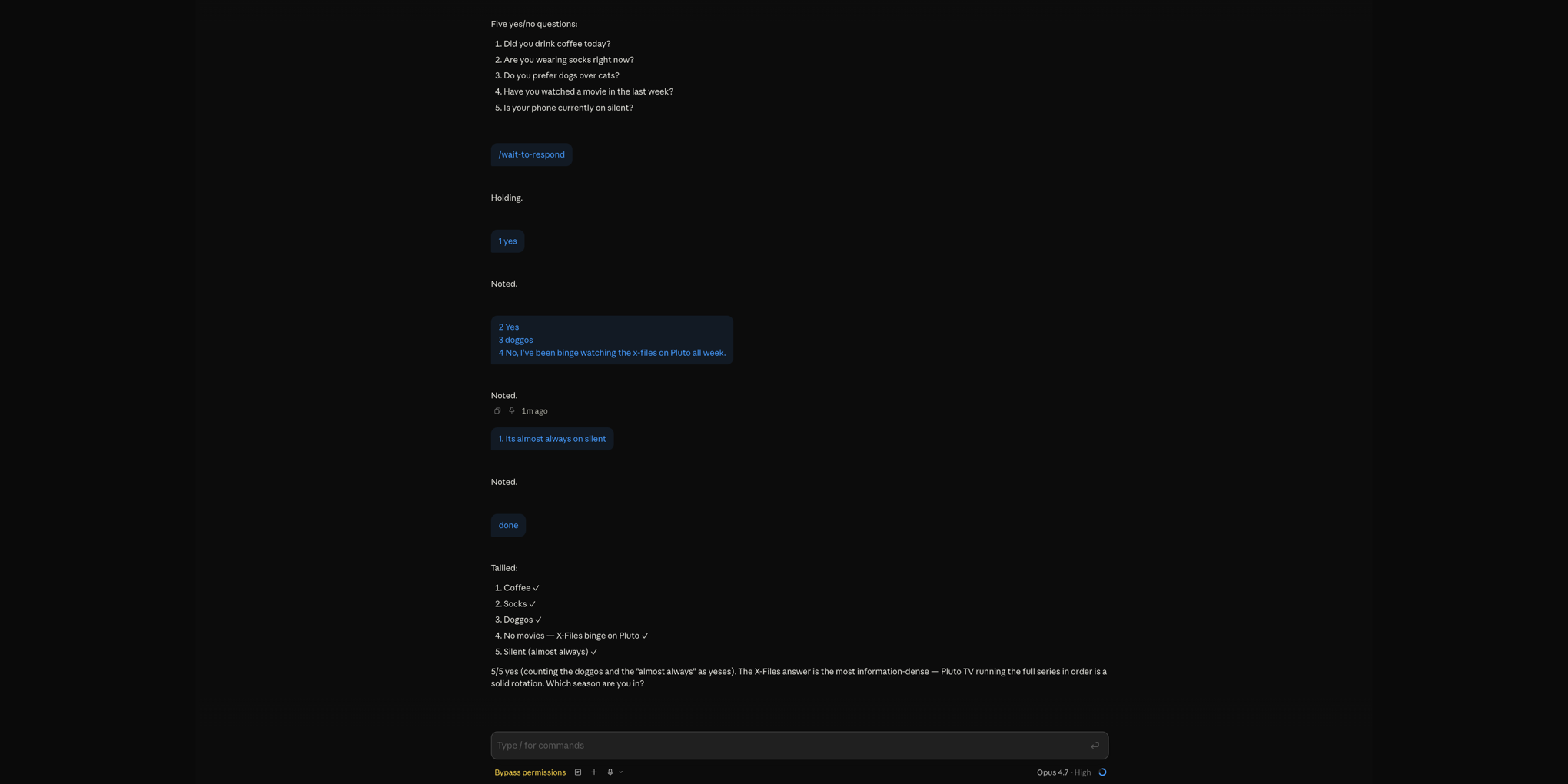
I have a habit. Claude asks me a list of questions, I start answering the first one, and my fingers hit enter before my brain catches up. Or I press enter expecting a newline — because the textbox should let me, right? — and whoops, message sent. Half a thought, shipped.
This was wrecking my conversation flow. Claude would respond to the fragment. I'd course-correct. The thread would drift. By the time I'd gotten through all the questions, we were three tangents deep and I'd forgotten what the original list was.
I've read blog posts and watched vloggers endorse a workaround for this: when you realize you sent too early, press stop before Claude can respond, copy your fragment back into the text box, finish the thought, and resend. That way Claude sees the whole message instead of a fragment.
It works. But it's a lot of clicks for a problem that only requires Claude to wait. And it doesn't help at all with the case where I want to send in pieces, on purpose, because that's how my brain is working through the problem.
So I made a skill: wait-to-respond.
What it does
When I trigger it, Claude acknowledges each message I send but doesn't actually respond. I can send as many messages as I want — one-line fragments, long rambles, whatever. When I'm done, I send a single message containing one word:
done
That's Claude's cue to read everything I've sent and reply to the whole batch at once.
Why it works
The accidental-send problem is real, but it's not the main reason I reach for this. The main reason is that a chat textbox is a terrible place to think.
If Claude gives me a numbered list of five questions, I want to answer each one as I work through it. Hit send on #1. Type #2, hit send. Keep going. Small chunks, one at a time, the way my brain actually processes things. With wait-to-respond, I can do that without Claude jumping in after every message and derailing the rhythm.
It's also great for brainstorming. I'll dump a thought, realize a minute later I left out something important, send a follow-up. Another minute, another addition. No pressure to compose the perfect mega-prompt in a cramped input box. When I've gotten it all out, I send done and Claude catches up with the full picture.
When I use it
- Answering a list of questions one at a time
- Freeform brainstorming where I'm figuring things out as I type
- Long context dumps I'd rather feed in pieces than pre-structure
- Any time I want Claude to shut up and wait
The details that actually matter
The first version of this skill was three sentences long and it sort of worked. The current version is longer because a few edge cases kept biting me:
Strict done parsing. Only release the batch if the message, trimmed and lowercased, is exactly done. Not done!, not ok done, not done thanks — those are still part of the batch. Otherwise every "ok I'm done thinking, so…" got treated as the release signal and Claude would fire mid-thought.
Long-gap check-ins. I'd walk away, forget I left the session in batch mode, and come back 18 hours later with "good morning". Without a check-in, Claude would silently add that to the batch. Now, if there's a clear gap signal — a time jump, a "back now", a topic shift — Claude drops one line asking whether to release, cancel, or keep batching. Just once per gap.
Explicit cancel paths. "cancel", "never mind", "respond now", or a direct override like "actually just answer the first one" all drop the hold without needing a done. No confirmation prompt — the user already redirected.
No tool calls while holding. Even read-only ones. The whole point is low noise and low cost while I'm still composing. Tools come back online once the batch releases.
Acknowledgements are optional and terse. "Got it." "Noted." "Holding." Never a chatty "Sure thing, I'll keep collecting your thoughts and wait patiently!" — that defeats the purpose. Silence is usually better.
One papercut I haven't fixed
There's a related rendering quirk worth flagging. When I type 2. to start my answer to the second question, the Claude Code input box autoformats it as a numbered list starting at 2 — exactly what I want. But on send, the markdown renderer normalizes every numbered list to start at 1., so my 2 becomes a 1. Claude has always matched the answer back to the right question from context, so it's never actually caused a problem, but it looks weird.
My workaround: type the bare number without the period (2 instead of 2.) so the autoformatter doesn't trigger in the first place.
A small thing, a real difference
It's embarrassing how much better my conversations with Claude got after I stopped fighting the send button. The model was never the problem. The interface assumption — that every message deserves an immediate reply — was. wait-to-respond lets me opt out of that assumption when I need to, and the quality of the eventual response is noticeably better because Claude sees the whole thought instead of five fragments of one.
Recommended if you, too, have ever hit enter and immediately wished you hadn't.
The full skill
---
name: wait-to-respond
description: Enter a batch-input mode where Claude silently collects a series of short messages from the user and only formulates a full response once the user sends a single message whose entire content is "done". Trigger when the user says anything like "wait to respond", "wait for done", "wait until I say done", "don't respond until I say done", "hold off until I'm done", "I'm going to send multiple messages", "batch mode", "let me think out loud", "I'm reviewing something in parts", "collect these and respond when I say done", or otherwise signals they want to send several messages before getting an answer. Do NOT trigger on a generic "hold on" or "wait" that just means "pause this tool call" — this skill is specifically for multi-message batching where the user wants to concatenate their own thoughts before Claude replies.
---

# Wait to Respond

The user thinks out loud across multiple messages and doesn't want a reply until they've finished assembling the full prompt. Your job is to stay quiet-but-present until they say `done`, then respond to the whole batch as one prompt.

## The contract

From the moment this skill activates until the user sends `done` (or cancels — see below):

1. **Do not formulate a full answer.** No analysis, no recommendations, no plans, no tool calls, no file reads, no edits. Don't start "thinking ahead" in visible text either.
2. **Acknowledgements are optional.** Silence is fine. If it feels right to reply (e.g. the user asked a direct question, or the message would otherwise feel dropped), keep it to one short line (≤10 words): "Got it.", "Noted.", "Holding.", "Still waiting for `done`." Never more than that.
3. **Remind sparingly.** If the user seems to expect an answer mid-batch, a one-line reminder is fine — e.g. "Still waiting for `done` before I respond." Don't repeat the reminder on every message.
4. **No tool use while holding.** Even read-only tools. The point is to minimize noise and cost while the user is still composing.

## Long gaps — check in once

The user may walk away mid-batch and forget they left the session holding. When a new message arrives after what looks like a significant gap (see signals below), do **not** silently extend the hold. Reply in one line and ask whether to stay in batch mode, release now, or cancel.

Example: "Still holding — it's been a while. Say `done` to release, `cancel` to drop the hold, or keep going."

Signals a gap may have happened:
- A timestamp or date hint in system context (e.g. `currentDate`) that's later than when the batch started.
- Contextual cues in the new message: "good morning", "back now", "picking this up again", "sorry, got pulled away", "still there?", or a topic shift that doesn't connect to the prior batched messages.
- The conversation's prior messages look like an unterminated batch with no recent activity.

Only check in **once per gap**. If the user continues batching after the check-in, resume normal holding behavior. Err on the side of asking if you're unsure — a single clarifying line is cheaper than a batch that rots for 18 hours.

## Detecting `done`

Treat a message as the release signal **only** if, after trimming whitespace and lowercasing, its entire content is exactly `done`. Not `done!`, not `ok done`, not `done thanks` — those are still part of the batch. If the user's release message is clearly meant as `done` but has trailing punctuation or an emoji, it's fine to treat as `done`; use judgment, and when in doubt, ask in one line: "Treat that as `done`?"

When released:

1. Mentally concatenate all the user's batched messages in order, as if they were one prompt with blank lines between segments.
2. Respond to the combined prompt as you normally would — full analysis, tool calls, the works.
3. Don't recap the batched messages back at the user before answering. They wrote them; they know what they said. Jump straight to the response.

## Exiting early

The user can cancel the hold without sending `done`. Treat any of these as a cancel:

- "cancel" / "never mind" / "nvm"
- "respond now" / "go ahead" / "answer now"
- A direct instruction to do something immediately that clearly overrides the batch (e.g. "actually just answer the first one")

On cancel, drop the hold and respond to whatever's been sent so far. Don't ask for confirmation — the user has already redirected you.

## What this skill is NOT

- Not a generic "be quiet" mode. Once `done` arrives, respond normally and fully.
- Not a reason to skip tool calls that the *final* response needs. Hold tools during the batch; use them freely once released.
- Not persistent across sessions. It applies to the current conversation only, starting when triggered and ending on `done` or cancel.

## If you do acknowledge — style

Match the user's register. If they're casual, "got it" is fine. If they're terse and technical, "noted" is fine. Never add filler ("Sure thing, I'll keep collecting your thoughts and wait patiently…"). The whole point is low-noise batching; a chatty acknowledgement defeats it. When in doubt, stay silent.